In the era of artificial intelligence (AI) and machine learning (ML), data is no longer limited to structured rows and columns. Instead, we deal with unstructured data like text, images, audio, and video. To manage and query this complex data efficiently, vector databases have emerged as a game-changing technology. This blog explores vector databases, their features, advantages over traditional databases, drawbacks, and applications.
What are Vector Databases?
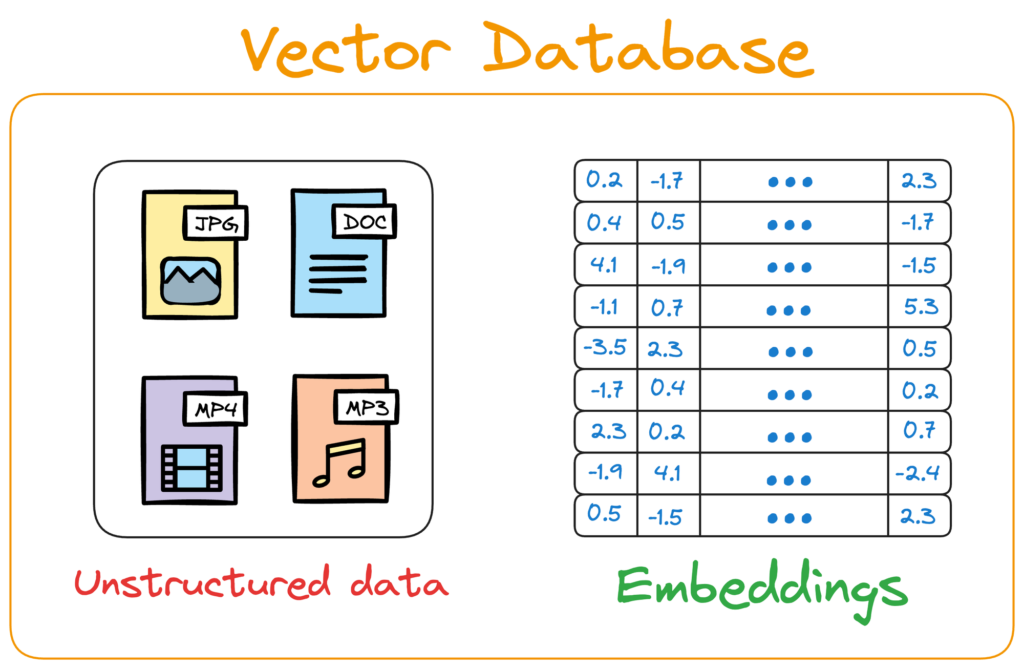
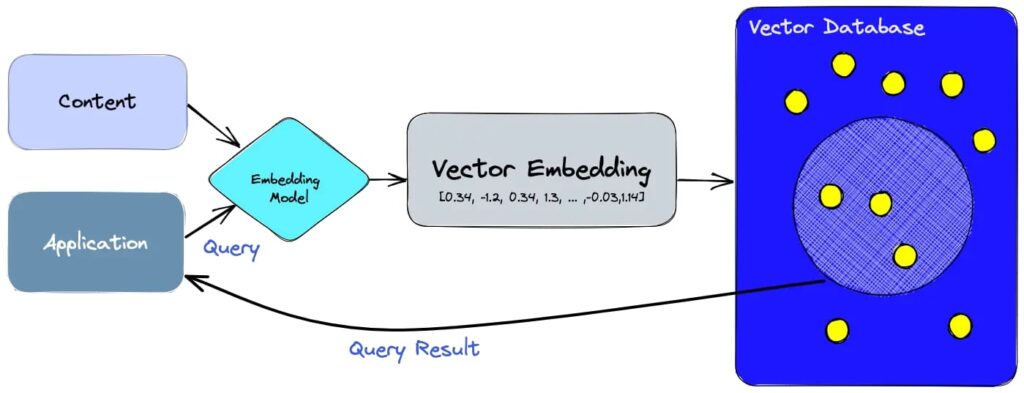
A vector database is a specialised database designed to store, index, and query high-dimensional vector embeddings. These embeddings are numerical representations of data generated by ML models to capture semantic or contextual relationships. The process involves mapping vectors to a data structure that allows for quick similarity or distance searches. When a query is made, the database computes an embedding of the query, calculates distances between this query vector and the indexed vectors, and returns the most similar vectors or nearest neighbors based on similarity metrics like cosine similarity. Unlike traditional databases that rely on exact matches or scalar values, vector databases excel at similarity searches, making them ideal for AI-driven applications like recommendation systems and semantic search.
Features of Vector Databases
Efficient Indexing
Imagine you’re in a giant library with millions of books, and you need to find books similar to one you already have. Searching through every book individually would take forever, right? Instead, libraries use indexes — lists that organise books by topics, authors, or genres — to help you find what you’re looking for quickly. Vector databases work similarly, but instead of books, they deal with vectors mathematical representations of things like text, images, or sounds.

Efficient indexing in vector databases is like creating a “map” to quickly locate vectors that are most similar to a query, saving time and computational power. Instead of comparing your query against every stored vector, indexing organises vectors using advanced algorithms like Flat Index, Locality-Sensitive Hashing (LSH), Hierarchical Navigable Small World (HNSW), and Inverted File Index (IVF). These methods narrow down the search space, making vector databases ideal for applications like search engines, recommendation systems, and AI tools that retrieve relevant answers quickly. While faster indexing methods prioritise speed by sacrificing some accuracy, slower ones like flat indexing ensure perfect precision but take longer to process large datasets.
Similarity Search
Similarity search in vector databases is like having a smart system that finds things based on how similar they “feel” rather than looking for exact matches. For example, if you upload a picture of a dog, it converts the image into a unique set of numbers (called a vector) and compares it to other vectors in its database to find ones that are close, meaning they’re similar. It works for all kinds of data — text, images, or sounds — and measures similarity by checking how “close” the vectors are to each other. This is how apps like Google, Netflix, and Spotify give you personalized results, like showing articles related to your search or recommending movies and songs you might like!
Scalability
Scalability in vector databases means they can handle massive amounts of data — like billions of vectors — without slowing down or crashing. Imagine a growing library where new books are added every day. A scalable system ensures you can still find what you need quickly, even as the collection grows. Vector databases use smart techniques to distribute data across multiple servers, so they stay fast and efficient, no matter how big the dataset gets. This makes them perfect for applications like search engines and recommendation systems that deal with enormous amounts of information.
Real-Time updates
Real-time updates in vector databases allow them to add, delete, or modify data instantly without needing to pause or rebuild the entire system. Imagine if you could add new books to a library and immediately see them in the catalog without waiting for hours. This feature is crucial for dynamic applications like social media or e-commerce platforms, where new content or products are constantly being added, and the system needs to reflect those changes instantly during searches.
Metadata Filtering
Metadata filtering in vector databases allows you to narrow down search results by applying specific conditions based on additional information (metadata) stored alongside each vector, like categories, dates, or tags. For example, if you’re searching for movies in a vector database, you can filter results to include only those directed by “George Lucas” or released in “1977.” This process reduces the search space, making queries faster and more accurate. Metadata filtering can happen either before or after the similarity search: pre-filtering limits the dataset upfront, while post-filtering refines results after the search. This feature is especially useful for applications like personalized recommendations, role-based access control, and structured searches in large datasets.
Integration with AI Models
Vector databases integrate seamlessly with AI models by storing and managing the numerical representations (vectors) generated by these models. These vectors capture the essential features of data, like the meaning of text or the visual patterns in images. When an AI model processes data, it creates vectors that the database stores for quick retrieval during tasks like similarity searches or recommendations. This integration allows AI systems to efficiently find relevant information, enabling applications like chatbots, recommendation engines, and semantic search. Additionally, vector databases can feed data back into AI models for continuous learning, making them a critical component of modern AI workflows.
Fault Tolerance and Security
Fault tolerance means vector databases can keep working even if something goes wrong, like a server crashing or losing power. Imagine a library where some shelves collapse but the books are still safe because they were backed up elsewhere — fault tolerance ensures no data is lost and the system keeps running smoothly. Security features like access controls prevent unauthorized people from accessing sensitive data, making vector databases reliable and safe for applications like banking, healthcare, or any system that handles private information.
Applications of Vector Databases
Semantic Search
Semantic search helps find information based on meaning rather than exact words. For example, if you search “How do airplanes fly?” a vector database understands the idea behind your question and finds articles or videos explaining flight, even if they don’t use the exact same words. This is different from regular search engines that only match keywords, making semantic search smarter and more useful for finding relevant results.
Recommendation Systems
Recommendation systems use vector databases to suggest things you might like based on your preferences. For example, if you watch a movie on Netflix, the system compares its “vector” (a mathematical representation of the movie) with other movies’ vectors to recommend similar ones. This is how platforms like Spotify, Amazon, or YouTube give you personalized suggestions for songs, products, or videos.
Image and Video Recognition
In image and video recognition, vector databases store numerical representations of pictures or videos, like a “fingerprint” for each one. For example, if you upload a picture of a dog, the database can quickly find similar images of dogs by comparing their vectors. This is used in apps like facial recognition systems or tools that help you shop for products by uploading photos.
Large Language Models (LLMs)
Vector databases work with large language models (LLMs) like ChatGPT by storing the “meaning” of text as vectors. When you ask a question, the database helps the AI quickly retrieve relevant information or context to generate accurate responses. This makes chatbots and virtual assistants smarter and able to provide better answers.
Anomaly Detection
Anomaly detection uses vector databases to spot unusual patterns in data. For example, in banking, it can detect fraud by noticing transactions that don’t match a person’s usual spending habits. By comparing vectors of normal behavior with new data, it flags anything that looks suspicious, helping prevent fraud or cyberattacks.
Autonomous Vehicles
Autonomous vehicles use vector databases to process sensor data like images from cameras or LiDAR scans. These vectors help the car recognize objects (like pedestrians or stop signs) and make decisions in real time. By comparing what it “sees” with stored data, the vehicle can navigate safely and avoid obstacles.
Drug Discovery and Genomics
In drug discovery and genomics, vector databases store complex biological data like molecular structures or DNA sequences as vectors. Scientists can then search for molecules with similar properties to find potential new medicines faster. This speeds up research in areas like curing diseases or designing vaccines by identifying promising candidates more efficiently.
Drawbacks of Vector Databases
- Complexity — Require specialized expertise to set up and maintain indexing algorithms and distributed systems
- Resource Intensive — High computational demands for indexing and querying large datasets.
- Approximation Trade-offs — Use Approximate Nearest Neighbor (ANN) techniques that may sacrifice accuracy for speed.
- Limited Transactional Support — Lack robust support for complex transactional operations compared to relational databases.
- Interpretability Issues — Results are less interpretable since they rely on black-box embeddings generated by ML models.
- Integration Challenges — Difficult to integrate into existing systems that rely on traditional database architectures
Conclusion
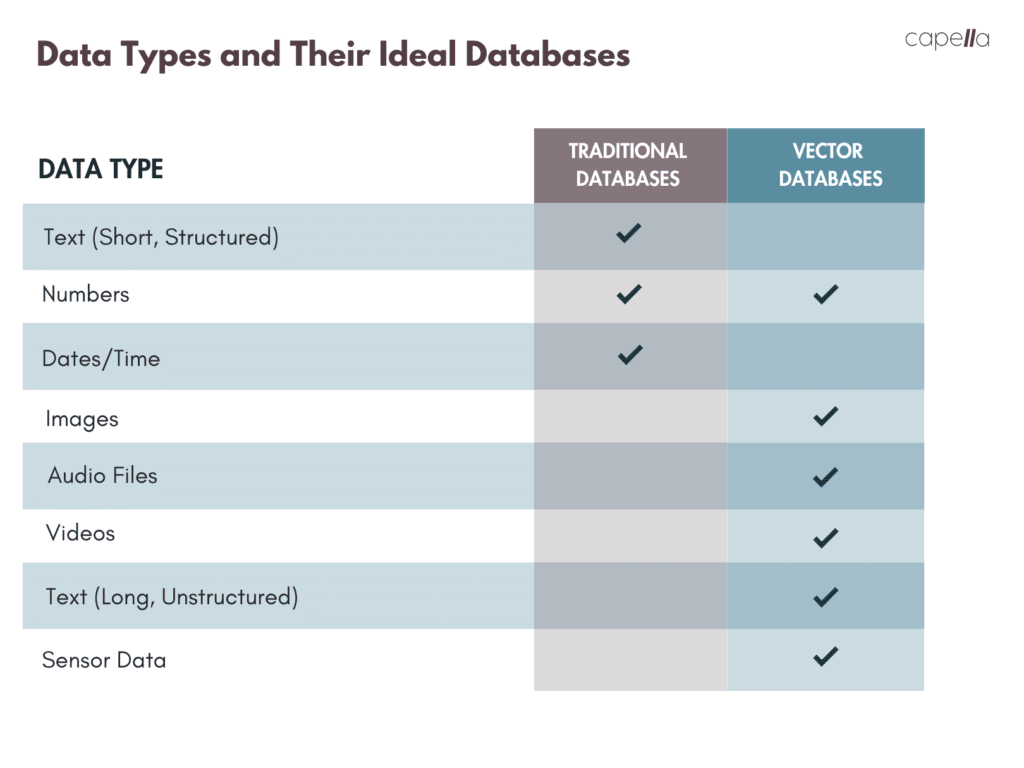
Vector databases are specifically designed to handle unstructured or high-dimensional data, such as text, images, and videos, by storing them as vectors (mathematical representations). They excel in applications requiring similarity searches, semantic understanding, and AI integrations, making them ideal for modern use cases like recommendation systems, image recognition, and large language models (LLMs).
On the other hand, traditional databases like relational databases are optimized for structured data stored in rows and columns. They are better suited for transactional operations, financial systems, inventory management, and applications requiring strict data integrity. Traditional databases struggle with unstructured data and high-dimensional computations, often leading to slower performance in tasks like similarity search.
Vector databases are better suited for AI-driven applications requiring semantic understanding and similarity searches across unstructured data. However, traditional databases remain superior for structured data management and transactional workloads. The choice between the two depends on the specific needs of the organization — many enterprises are now adopting vector databases alongside traditional systems to complement their capabilities.
References
- https://www.pinecone.io/learn/vector-database/
- https://www.decube.io/post/vector-database-concept
- https://www.instaclustr.com/education/vector-databases-explained-use-cases-algorithms-and-key-features/
- https://www.v7labs.com/blog/vector-databases
- https://en.wikipedia.org/wiki/Vector_database
- https://lakefs.io/blog/what-is-vector-databases/
- image source 1: https://www.dailydoseofds.com/a-beginner-friendly-and-comprehensive-deep-dive-on-vector-databases/
- image source 2: https://www.dailydoseofds.com/a-beginner-friendly-and-comprehensive-deep-dive-on-vector-databases/
- image source 3: https://www.thesimplicityhabit.com/best-way-organize-books/
- image source 4: https://www.capellasolutions.com/blog/vector-databases-vs-traditional-databases-a-comparative-study